Choosing the Right Data Destruction Standard
One Wrong Assumption Can Leave Your Data Behind
A company finishes a laptop refresh. Hundreds of retired devices sit in a storage room, ready for disposal.
Before shipping them to an IT asset disposition (ITAD) provider, the internal IT team runs a legacy software tool and calls the drives clean. Confident in that result, they approve every asset for resale.
Months later, someone finds sensitive data still sitting on one of those laptops.
The team didn’t skip data destruction. Instead, they trusted an outdated method that never fit the storage media in front of them.
Storage technology keeps changing, and data destruction standards have changed with it. Traditional hard disk drives (HDDs), solid-state drives (SSDs), virtual storage, and hybrid environments all behave differently. As a result, one method can no longer cover every device.
Many organizations still work from old assumptions about what counts as secure data destruction. That gap matters, because the wrong choice affects cybersecurity, compliance, audit readiness, and overall risk.
So before you retire another data-bearing device, it helps to understand how NIST SP 800-88 differs from the legacy DoD 5220.22-M approach.
The Problem: Choosing a Method Based on Reputation
For years, “DoD wipe” simply meant secure data destruction. Many IT professionals, procurement teams, and business leaders still reach for the term today.
Storage technology, however, has moved on. Modern organizations run SSDs, flash storage, virtual environments, cloud infrastructure, and self-encrypting drives. These technologies behave nothing like the magnetic hard drives that older overwrite methods targeted.
Yet the legacy vocabulary sticks around, even when the method no longer fits the hardware. Consider a few examples:
- Some storage devices resist multiple overwrite passes entirely.
- Not every asset needs physical destruction.
- Compliance frameworks don’t all demand the same approach.
Instead of asking “How many overwrite passes should we use?”, ask four better questions:
- What type of storage media are we retiring?
- How sensitive is the data on it?
- What do current industry standards recommend?
- How will we verify that the data is gone?
These questions point you toward a method that actually fits the device.
Why Choosing the Right Standard Matters
Selecting a data destruction standard involves much more than deleting files. Poor sanitization creates cybersecurity risk, complicates compliance, and makes audits harder to defend.
Retired devices often still hold:
- Customer information
- Financial records
- Healthcare data
- Intellectual property
- Employee information
- Confidential business documents
If you reuse, resell, donate, or recycle those devices without proper sanitization, you may expose information that should stay protected.
Regulatory expectations also vary by industry. Healthcare organizations protect patient records, financial institutions guard customer data, and government agencies handle highly sensitive material.
Every industry, though, needs a defensible process. That process should account for both the storage technology and the sensitivity of the data. Recognized industry guidance keeps those procedures consistent, supports compliance, and gives you confidence that the data is truly gone.
Understanding NIST SP 800-88
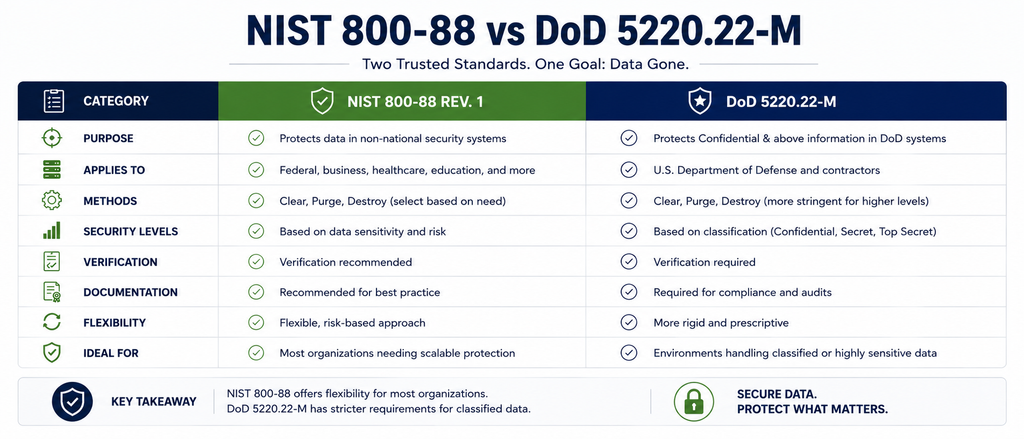
NIST Special Publication 800-88 Revision 1, better known as NIST 800-88, leads the field as a framework for media sanitization.
Rather than prescribing one method for every device, NIST offers a flexible framework built around three factors:
- The type of storage media
- The sensitivity of the information
- The intended disposition of the asset
From there, NIST sorts sanitization into three outcomes: Clear, Purge, and Destroy.
Clear
Clear removes data through logical techniques that defeat standard recovery tools.
This option usually fits media that stays inside your organization, where the level of risk remains relatively low.
Purge
Purge delivers a stronger level of sanitization and holds up against advanced recovery techniques.
Depending on the storage technology, a purge might use cryptographic erase, firmware-based secure erase commands, or another approved technique built for modern drives.
Destroy
When you need the highest level of assurance, or when a device simply cannot be sanitized, NIST points to Destroy.
Physical destruction covers shredding, crushing, pulverizing, and disintegration. Each method leaves the media impossible to reconstruct or reuse.
Flexibility gives the NIST approach its real advantage. Instead of treating every device the same, you match the method to risk, media type, and business requirements.
The Legacy DoD 5220.22-M Standard
DoD 5220.22-M earned its reputation by recommending multiple overwrite passes, which made stored information hard to recover from traditional magnetic hard drives. Software vendors then promoted “DoD wipes” as the gold standard for years.
That approach played an important historical role. Storage technology, however, has changed dramatically since those overwrite passes became popular.
Modern SSDs, flash-based storage, and self-managing storage architectures don’t respond to overwrites the way conventional hard drives did. Industry guidance has evolved right alongside them.
Today, best practice favors matching the sanitization method to media type and risk level instead of running multiple passes across every device.
Choosing the Right Data Destruction Method
NIST 800-88 asks you to evaluate the storage media first, and that step is its greatest strength.
Start with the asset’s intended use and the level of protection it requires. A device that stays inside your organization and carries low risk may only need logical sanitization. Equipment headed for resale, donation, or transfer usually calls for something stronger, up to and including physical destruction.
Media type shapes the decision too. HDDs, SSDs, and self-encrypting drives each store and manage data differently, so each one responds differently to sanitization.
Remember that erasing information isn’t the real goal. The goal is making sure nobody can recover that data once the asset leaves your control.
Finally, treat verification as seriously as the method itself. Keep documentation, validation records, and reporting that show the process finished successfully. Those records prove that your retired assets followed established procedures and recognized standards.
Common Mistakes Organizations Make
Modern guidance is easy to find, yet these four mistakes still show up regularly.
1. Assuming One Method Works for Every Device
Storage technologies don’t behave alike. Running the same overwrite procedure across every device can leave data behind on some assets while wasting hours on others. Check the media first, then pick the method.
2. Treating Legacy Standards as Current Best Practice
Plenty of teams still request a “DoD wipe” because the phrase feels familiar. Familiar terminology, however, doesn’t account for modern storage technology. Base your sanitization decisions on current best practice rather than habit.
3. Skipping Verification
A sanitization process without verification leaves you guessing. Verification confirms that the method worked, and it produces evidence that sensitive information is gone. Skip that step, and you’ll struggle to defend your disposal process during an audit.
4. Forgetting Documentation
Secure data destruction doesn’t end when the drive gets wiped or shredded. Keep detailed records that capture:
- The sanitization method used
- When the process happened
- Who performed it
- The final disposition of the asset
Good records build accountability and make future compliance reviews far easier.
Expert Insight
Storage technology keeps evolving, so outdated assumptions about data destruction carry a real cost.
Rather than debating which standard is “better,” ask a sharper question: which sanitization method suits this specific asset?
A modern ITAD program pulls together recognized industry guidance, documented procedures, asset tracking, and verification at every stage. Data destruction belongs inside a broader IT asset lifecycle strategy, not off to the side as a one-time task.
Align your process with current best practices, and you’ll reduce security risk, support compliance, and retire technology with confidence.
Frequently Asked Questions
Is DoD 5220.22-M still used today?
Some organizations still reference the DoD overwrite method, especially in legacy environments. Most teams, however, now build their media sanitization policies around current guidance such as NIST SP 800-88.
Can you securely wipe an SSD?
Yes, though SSDs need a different approach than traditional hard drives. Choose a sanitization method built for the specific storage technology you’re retiring.
Do all devices need to be physically destroyed?
No. The right method depends on the storage media, the sensitivity of the information, your internal policies, and whether the equipment will be reused, resold, or permanently retired.
How can organizations prove that data was destroyed?
A documented sanitization process, verification records, asset tracking, and certificates of destruction together show that your retired devices followed established procedures.
Ready to Strengthen Your Data Destruction Process?
Choosing the right data destruction standard goes beyond compliance. It protects your organization’s information across the entire IT asset lifecycle.
Follow recognized guidance, document every step, and match the sanitization method to each storage device. Do that consistently, and you’ll cut risk while retiring technology with confidence.
Talk to a Silverback Communications data destruction specialist to build the right sanitization strategy for your organization.
Need help comparing methods? Download our Data Destruction Method Selector and find the right sanitization approach for each storage type and retirement scenario.