
The Data Center Shutdown That Cost More Than Expected
A company was preparing to close one of its aging data centers. Most of its workloads had already moved to a new environment. On paper, the project looked simple: disconnect equipment, remove the racks, transport the hardware, and move on.
But reality told a different story.
Teams decommissioned critical servers before application owners finished final validation. Workers removed several network devices without proper documentation. That created confusion during inventory reconciliation. Weeks later, someone found a handful of storage drives sitting in an unsecured storage room — they’d been missed during the initial inventory. So, a project that was supposed to take a few days turned into weeks of delays, added costs, and unnecessary operational risk.
Unfortunately, this isn’t uncommon.
Many teams treat data center decommissioning as the last step of an infrastructure upgrade. In reality, it’s one of the most complex phases of the entire IT lifecycle. Every server, storage array, switch, cable, and rack represents more than physical equipment. Each one carries business continuity, sensitive data, compliance obligations, and potential resale value.
Without a structured plan, organizations risk downtime, misplaced assets, security vulnerabilities, and expensive project overruns. A successful decommission isn’t just about removing equipment. It’s about retiring infrastructure in a controlled, documented, and secure manner.
The Problem: Treating Decommissioning as a Cleanup Project
Many organizations underestimate what data center decommissioning actually involves.
Once a migration or hardware refresh wraps up, it’s tempting to assume the remaining infrastructure can simply be disconnected and hauled away. But every piece of equipment still needs careful planning before it leaves the facility.
Consider what might still be at stake:
- Servers may still contain sensitive business information.
- Storage systems may hold backups that haven’t been archived yet.
- Networking equipment may support applications no one remembered.
Even hardware that looks inactive can have dependencies. Remove it too early, and business operations can take the hit.
Beyond operations, there’s also physical logistics to plan for. Removing racks, cabling, UPS systems, networking hardware, and storage arrays takes coordination — IT teams, facilities staff, transportation providers, and IT asset disposition specialists all need to be in sync.
Skip a clear process, and organizations tend to run into the same problems:
- Missing or incomplete asset inventories
- Unexpected application downtime
- Data-bearing devices that were never properly sanitized
- Equipment that disappears during transportation
- Delays caused by poor project sequencing
- Lost opportunities to recover value from retired assets
So, treating decommissioning as a simple removal job — instead of a structured business process — raises both operational and financial risk.
Why a Structured Decommissioning Plan Matters
Every data center retirement project affects more than infrastructure. Business applications, employees, customers, compliance teams, finance departments, and executive leadership all have a stake in getting it right.
Here’s what tends to go wrong without proper planning:
Unplanned downtime. Removing equipment before you fully understand its dependencies can interrupt critical business services. That delays operations and affects customers.
Data security risks. Servers and storage devices often hold confidential information even after they leave production. If those assets aren’t tracked and sanitized properly, organizations open themselves up to unnecessary cybersecurity risk.
Compliance challenges. Many industries require proof of how retired IT assets were handled. Missing documentation or incomplete records can complicate audits and create avoidable compliance headaches.
Lost asset value. Enterprise hardware often holds resale value. Delay the decommission, or skip evaluating equipment before disposal, and organizations can miss the chance to recover part of their technology investment.
A structured strategy helps organizations reduce these risks. It also keeps projects organized, predictable, and accountable from start to finish.
The Data Center Decommissioning Checklist
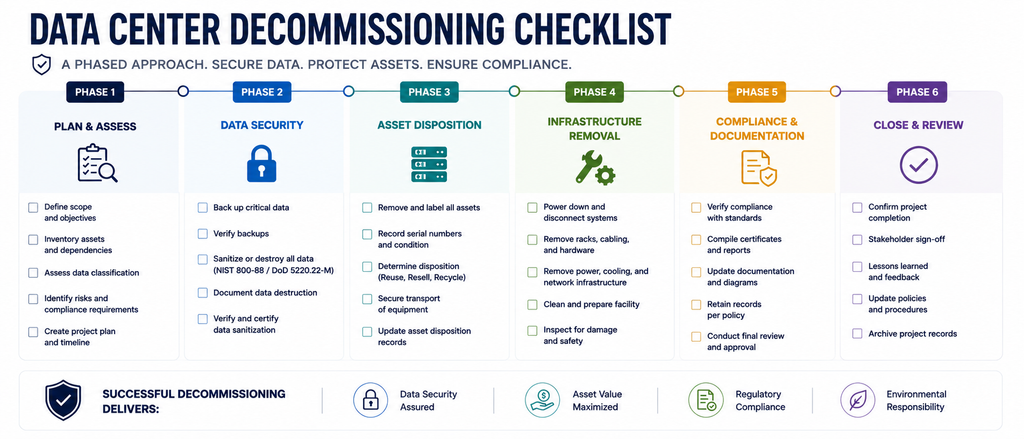
Every environment looks different, but successful projects tend to follow the same core phases.
Step 1: Define the Project Scope
Before any equipment gets powered down, set clear project objectives. Determine:
- Which systems are being retired
- Which assets are being migrated
- Which business units are affected
- Project timelines and milestones
- Internal stakeholders and responsibilities
Defining scope early helps prevent confusion as the project moves forward.
Step 2: Perform a Complete Asset Inventory
A successful decommission starts with knowing exactly what’s inside the facility. Every server, storage device, network switch, firewall, rack, UPS, cable, and peripheral needs documentation before work begins.
Asset inventories should include:
- Asset tags
- Serial numbers
- Device models
- Physical locations
- Ownership information
- Operational status
This inventory becomes the foundation for every stage that follows.
Step 3: Identify System Dependencies
Not every device can come out immediately. Before powering anything down, identify the dependencies between servers, applications, databases, networking equipment, and storage infrastructure.
Ask questions like:
- Are any production workloads still using this hardware?
- Have backups completed successfully?
- Have applications been validated after migration?
- Are disaster recovery requirements still being met?
Answering these questions early helps minimize unexpected outages later.
Step 4: Develop a Secure Data Protection Plan
One of the most critical phases of decommissioning is protecting the information stored on retiring equipment.
Organizations should determine:
- Which devices contain sensitive data
- Appropriate sanitization methods
- Whether equipment will be reused, sold, or recycled
- Documentation requirements for data destruction
Plan this stage early. That way, data security stays built into the project instead of becoming a last-minute scramble.
Step 5: Execute the Decommission in a Controlled Sequence
Once planning wraps up, the physical decommissioning can begin. But equipment should never come out randomly or based on convenience. Every action should follow the approved project plan — that’s what minimizes disruption and keeps the project accountable.
Typical activities at this stage include:
- Powering down systems according to the approved schedule
- Disconnecting and labeling network and power cables
- Removing servers, storage arrays, and networking equipment in the correct sequence
- De-racking equipment safely to prevent damage
- Preparing assets for transportation using secure handling procedures
Keep IT, facilities, project managers, and vendors talking throughout this phase. Consistent communication keeps the project on schedule and reduces the odds of surprises.
Step 6: Maintain Chain of Custody Throughout the Process
Once equipment leaves the data center, tracking shouldn’t stop. Organizations need to follow every asset until its final disposition.
A documented chain of custody records:
- When equipment was collected
- Who handled the assets
- Where the equipment was transported
- When custody changed hands
- When processing was completed
This documentation creates an auditable history for every retired asset. It also helps prove that equipment stayed secure throughout the process.
For organizations handling sensitive information, an unbroken chain of custody is one of the best safeguards against asset loss and unauthorized access.
Step 7: Secure Data Destruction and Responsible Asset Disposition
Before retired equipment gets reused, resold, or recycled, organizations must confirm that data-bearing devices have been properly sanitized.
Depending on the storage media and organizational requirements, that might mean certified data erasure, physical destruction, or another approved sanitization method. Once data has been securely removed, organizations can decide on the right disposition for each asset.
Some equipment still holds market value and can qualify for IT buyback or refurbishment programs — a way to recover part of the original investment. Equipment that’s no longer suitable for reuse should go through certified recycling channels. That supports environmental responsibility and keeps organizations compliant.
Build data security and value recovery into the process together, and organizations reduce risk while getting more out of retired infrastructure.
Step 8: Complete Documentation and Project Reporting
The final phase of a successful decommissioning project is documentation. Organizations should confirm that every planned asset is accounted for and that all required records are complete.
Final documentation may include:
- Updated asset inventories
- Chain of custody records
- Certificates of data destruction
- Asset disposition reports
- Recycling or buyback documentation
- Project completion summaries
Comprehensive records support future audits, internal governance, compliance requirements, and lifecycle management planning. A well-documented project also offers insights that can improve future hardware refreshes and infrastructure retirements.
Common Mistakes During Data Center Decommissioning
Even experienced organizations run into trouble decommissioning a data center. Most of these issues come from inadequate planning, not technical complexity.
Some of the most common mistakes include:
- Removing equipment before completing a full asset inventory
- Overlooking application and infrastructure dependencies
- Failing to sanitize storage devices before disposition
- Losing visibility of assets due to poor chain of custody
- Delaying projects until hardware loses significant resale value
- Treating documentation as an afterthought instead of an essential deliverable
Avoid these mistakes, and organizations can complete projects more efficiently while cutting operational, financial, and security risk.
Expert Insight
Successful data center decommissioning isn’t measured by how fast equipment leaves the building. It’s measured by how well organizations manage risk throughout the process.
Every project should balance operational continuity, data security, compliance, environmental responsibility, and asset value recovery. Integrate these priorities into a structured strategy, and organizations can retire infrastructure with confidence — while keeping full visibility over every asset.
Decommissioning doesn’t have to mark the end of the IT lifecycle. Instead, organizations can treat it as a strategic opportunity: a chance to strengthen governance, improve operational efficiency, and recover value from retiring technology.
Frequently Asked Questions
It depends on the size of the facility, the amount of equipment involved, application dependencies, and project complexity. Proper planning is the biggest factor in keeping the project on schedule.
Identify system dependencies, validate migrations, coordinate stakeholders, and follow a phased project plan before removing any equipment.
Depending on its condition, equipment may be redeployed, refurbished, sold through IT buyback programs, or processed through certified recycling after secure data destruction.
Documentation proves how assets were handled, supports compliance and audit requirements, maintains accountability, and confirms that every retired asset was processed according to plan.
Ready to Plan Your Next Data Center Decommission?
A successful data center decommission takes more than removing hardware. It demands careful planning, secure asset handling, documented processes, and responsible disposition from start to finish.
Contact Silverback Communications for a data center decommissioning consultation. Our team can help you build a structured plan that minimizes downtime, protects sensitive data, and maximizes the value of your retiring IT assets.
Looking for a step-by-step planning resource? Download our Data Center Decommissioning Checklist to help your team prepare for every phase of a secure, well-organized infrastructure retirement.